
Speed
Cart

Speed Cart
Project Overview
When: 11/15/2024 - 12/4/2024
Where: Boston University
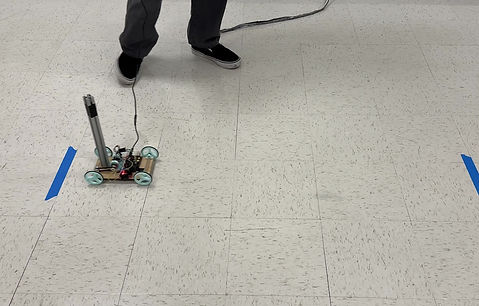
Speed Cart is a motor controlled kart that can transport a vertical beam over a specified distance and back without toppling it over.
Features
Overall Dimensions:
125 x 200 x 60 mm (4.9 x 7.9 x 2.4 in)
Top Speed:
Up to 630 mm/s
Top Acceleration:
Up to 320 mm/s^2
Input:
Arduino Uno IDE (C++)
Controller:
Arduino Uno
Closed Loop Control:
Dynamically maintains top speed and acceleration while in motion
Components
Existing Parts:
-
Wooden Base Plate (1)
-
Arduino Uno (1)
-
12V Gear Motor (1)
-
L298N Motor Drive Controller (1)
-
Axel Rod (2)
-
Rubber O-Rings (4)
-
GT2 Timing Pulley (2)
-
GT2 Belt (1)
-
Jumper Wire (10)
-
Various Screws and Tape (15)
3D Printed (PLA):
-
Wheel (4)
-
Axel Mount (4)
-
Motor Mount (1)
External Creation
Cart Base:
The base of the Speed Cart is a thin wooden slab that was laser cut to create the rectangular shape and the screw holes for the axel mounts, Arduino Uno, and motor drive controller.
Drivetrain:
The wheels were created with style and functionality in mind. The three spoke design promoted a sporty design in addition to plastic saving during 3D printing. The wheel was designed with a v-shaped groove on the tread to allow for the fitting of a rubber O-ring, allowing for increased traction. The wheels were friction fit onto the axel.
The axel rode on a 3D printed mount. The mount was sanded to reduce friction between the mount and the axel. A timing pulley was attached to the axel to transfer the power from the motor onto the wheels.
The motor was held in place by a custom 3D printed mount. A timing pulley on the end of the motor helped deliver power from the motor to a belt to the axel pulley.
Controllers:
The rest of the components were screwed and taped onto the base plate.
Applicable Skills:
-
Conceptual Design Sketches
-
Design with Constraints
-
SolidWorks 3D CAD Models
-
SolidWorks Motion Study Simulations and Calculations
-
Laser Cutting
-
3D Printing
-
Part Assembly
Programming
Arduino Uno IDE (C++):
The user inputs the max velocity, acceleration, and distance into the Arduino code. The cart accelerates from standstill to the maximum speed of the motor, maintains the top speed, decelerates, and stops at the desired distance. The code will then do the reverse process to send the cart back to the original position. During the cart's motion, a closed loop in the code dynamically checks the velocity of the motor and adjusts the speed to match the desired velocity/acceleration inputed in the code.
SolidWorks Motion Study:
The max acceleration was calculated using hand-written calculations. SolidWorks motion simulations were used to back up the calculations. Force vs time plots were created with the max acceleration. If the force on the plots hit 0 N or double the force (5 N), this meant that the bar was on the very edge of toppling, confirming the max acceleration calculations. The real acceleration values were lower due to external factors affecting the results. These plots can be found in the Photos section.
Applicable Skills:
-
Arduino Coding (Closed Loop Control)
-
Motor Velocity/Acceleration Calculations
-
Adjusting Calculations for Real Experimental Testing
Additional Considerations
This design has to be plugged into a wall outlet for power, therefore the max theoretical distance the cart can travel is dependent on the length of the power cable. The cart has to be plugged into the computer to update the values for new tests.
Additional Skills:
-
Organizing Team Meetings
-
Work Allocation among Team Members
-
Team Communication and Collaboration
-
Communicating Uncertainties with Professor
-
Utilizing Feedback
-
Meeting Deadlines


